Category Archives: howto’s

Redirect mobile and desktop users to the correct CSS via .htaccess file

The winning solution for a mobile compliant website is to have a single HTML structure for every visitor, and just choose the appropriate CSS to render the page correctly for both worlds; so, I’m not speaking here about a /mobile/ folder under your website root, nor any ?mobile query string, but about the exact same URL, that has all the candy when viewed by a desktop browser, while is super-compact and sleak if the browser is running on a smartphone.

How do you do that?

First, get yourself two stylesheets suited for desktop and mobile, or rather, like I did, prepare a set of CSS files, where there is a “common.css” always used, and a “desktop.css” and “mobile.css” that get loaded when needed. Also, get yourself minify in order to define a “desk” and a “mobi” group of files to load with a simple URL (I use this procedure on another website).

Then add this to your .htaccess file, fairly early after the start of the RewriteEngine:

RewriteCond %{HTTP_USER_AGENT} !^.*(2.0\ MMP|240x320|400X240|AvantGo|BlackBerry|Blazer|Cellphone|Danger|DoCoMo|Elaine/3.0|EudoraWeb|Googlebot-Mobile|hiptop|IEMobile|KYOCERA/WX310K|LG/U990|MIDP-2.|MMEF20|MOT-V|NetFront|Newt|Nintendo\ Wii|Nitro|Nokia|Opera\ Mini|Palm|PlayStation\ Portable|portalmmm|Proxinet|ProxiNet|SHARP-TQ-GX10|SHG-i900|Small|SonyEricsson|Symbian\ OS|SymbianOS|TS21i-10|UP.Browser|UP.Link|webOS|Windows\ CE|WinWAP|YahooSeeker/M1A1-R2D2|iPhone|iPod|Android|BlackBerry9530|LG-TU915\ Obigo|LGE\ VX|webOS|Nokia5800).* [NC]
RewriteCond %{HTTP_user_agent} !^(w3c\ |w3c-|acs-|alav|alca|amoi|audi|avan|benq|bird|blac|blaz|brew|cell|cldc|cmd-|dang|doco|eric|hipt|htc_|inno|ipaq|ipod|jigs|kddi|keji|leno|lg-c|lg-d|lg-g|lge-|lg/u|maui|maxo|midp|mits|mmef|mobi|mot-|moto|mwbp|nec-|newt|noki|palm|pana|pant|phil|play|port|prox|qwap|sage|sams|sany|sch-|sec-|send|seri|sgh-|shar|sie-|siem|smal|smar|sony|sph-|symb|t-mo|teli|tim-|tosh|tsm-|upg1|upsi|vk-v|voda|wap-|wapa|wapi|wapp|wapr|webc|winw|winw|xda\ |xda-).* [NC]
RewriteRule ^stylesheets\.css$ /min/index.php?g=cssdesk [L]
RewriteRule ^stylesheets\.css$ /min/index.php?g=cssmobi [L]

First of all, these directives do not consider the iPad as a mobile device, since it has plenty of screen space in my opinion to just work as a desktop browser; if you do not agree, just insert an “ipad” string in there together with the rest.

Some explaining is in order: credit for the RewriteCond’s goes to the creators of WP Supercache, which has been a model to write my own caching system on another website of mine (next article is coming about the caching routine itself).

Those RewriteCond lines tie the next RewriteRule directive only to desktop browsers (since they exclude all user agents that can be associated to mobile devices), so the first RewriteRule redirects to the /min/index.php?g=cssdesk minified CSS set tailored for desktops (change it as needed). The [L] directive right after it tells .htaccess to ignore everything else after that. When the RewriteCond’s are not met, it means a mobile device is coming to your site, so the first RewriteRule is ignored, and the one after that is used that redirects to the mobile CSS set instead.

You see that I redirect requests for a file named “stylesheets.css”. Guess what, this file doesn’t exist on my website, and it just references from the template’s HTML: it’s .htaccess that deals with giving the browser the correct data. In this case all you have to do is reference the stylesheets in your HTML code like this:

<link rel="stylesheet" href="/stylesheets.css" type="text/css" media="screen" />

The advantages? This is faster if compared to the same operation done with PHP, since a webserver processes .htaccess directives faster than it compiles PHP code, plus you may be saving an additional include operation on an external PHP file. Also, an approach of this type is absolutely needed if you want to implement a no-PHP-execution caching system, because then there would be no PHP code to use to address browsers to the desktop or mobile CSS, would it.

Zip MySQL database backup with PHP and send as email attachment

I was a happy user of MySQLDumper until a while ago, when my shared hosting upgraded to the cloud architecture and latest PHP version; with that, some modules for PERL went missing and I was left without a viable backup solution (MySQLDumper PHP approach uses a javascript reloading routine which is superslow and is not compatible with wget nor remote cronjobs like SetCronJob.com).

So I found a couple of tutorials on the net (this, and this), mixed them together, especially improving David Walsh’s routine, blended them with some healthy bzip2 compression, and shipped to my webspace.

I stripped the part where you can select which tables to backup; I figured that any backup deserving this name should be “all-inclusive”; also I think that anyone with the special need to backup only selective tables should also be smart enough to change the code to suit his/her needs.

UPDATE 9/9/11: I just added a snippet of code to blacklist some tables from the backup, since I needed to trim the size or it gave a fatal error about the available memory being full; just fill the array with rows as you see fit

This is the result:

<?php
$creationstart=strtok(microtime()," ")+strtok(" ");

$dbhost="your.sql.host";
$dbname="yourdbname";
$dbuser="yourmysqlusername";
$dbpass="yourmysqlpassword";

$mailto="mail.me@mymailbox.com";
$subject="Backup DB";
$from_name="Your trustworthy website";
$from_mail="noreply@yourwebsite.com";

mysql_connect($dbhost, $dbuser, $dbpass);
mysql_select_db($dbname);

$tablesblocklist=array(
    "tablename1"=>1,
    "tablename2"=>1,
    "tablename3"=>1,
);
$tables = array();
$result = mysql_query("SHOW TABLES");
while($row = mysql_fetch_row($result))
$tables[] = $row[0];
foreach($tables as $table) {
if (!isset($tablesblocklist[$table])) {
$result = mysql_query("SELECT * FROM $table");
$return.= "DROP TABLE IF EXISTS $table;";
$row2 = mysql_fetch_row(mysql_query("SHOW CREATE TABLE $table"));
$return.= "\n\n".$row2[1].";\n\n";
while($row = mysql_fetch_row($result)) {
$return.= "INSERT INTO $table VALUES(";
$fields=array();
foreach ($row as $field)
$fields[]="'".mysql_real_escape_string($field)."'";
$return.= implode(",",$fields).");\n";
}
$return.="\n\n\n";
}
}
$filename='db-backup-'.date("Y-m-d H.m.i").'.sql.bz2';

$content=chunk_split(base64_encode(bzcompress($return,9)));
$uid=md5(uniqid(time()));
$header=
"From: ".$from_name." <".$from_mail.">\r\n".
"Reply-To: ".$replyto."\r\n".
"MIME-Version: 1.0\r\n".
"Content-Type: multipart/mixed; boundary=\"".$uid."\"\r\n\r\n".
"This is a multi-part message in MIME format.\r\n".
"--".$uid."\r\n".
"Content-type:text/plain; charset=iso-8859-1\r\n".
"Content-Transfer-Encoding: 7bit\r\n\r\n".
$message."\r\n\r\n".
"--".$uid."\r\n".
"Content-Type: application/octet-stream; name=\"".$filename."\"\r\n".
"Content-Transfer-Encoding: base64\r\n".
"Content-Disposition: attachment; filename=\"".$filename."\"\r\n\r\n".
$content."\r\n\r\n".
"--".$uid."--";
mail($mailto,$subject,"",$header);

$creationend=strtok(microtime()," ")+strtok(" ");
$creationtime=number_format($creationend-$creationstart,4);
echo "Database backup compressed to bz2 and sent by email in $creationtime seconds";
?>

(WordPress killed the indenting and I’ve no intention of fixing it manually)

The whole routine runs in roughly 7seconds on my not-so-bright hoster server, including bzip2’ing and mailing, while the original text-only output for David’s code took on the same server roughly 17seconds; probably it’s due to the removal of several redundant loops, and using the builtin mysql_real_escape_string() and implode() functions instead of David’s workarounds.

My sincere thanks go to the authors of the two guides, without whom I wouldn’t be writing this today 😉

Low power consumption server with integrated car battery UPS

I wrote in another post how I simply attached a car battery to a standard market UPS to give it even more juice; in that occasion, several users commented how I committed several shortcomings regarding the assembly.

Also taking into consideration that comments, this morning I rearranged the power supply of my home server to make it more silent and power efficient/independent.

On a side note, most comments were centered about me using thin cables to connect to the battery, with the reason that a car battery can deal a lot of amperes together, making a thin cable overheat, leading to possible fires. At first I credited them, but then I realized something, for which they should also get back to earth: we are not talking about shorting the battery leads for test purposes, but about using a day-to-day load, especially since it’s a low-power home server that together with accessories drain maximum 60W, which is 5amperes at 12V voltage.
Enter PicoPSU: you get a little toy able to give out up to 95W constant power (with my own model, but they make them up to 160W), which is 8amp at 12V. There is an 8 amperes current flowing through the cable running from the barrel connector of the PicoPSU… now please go and check the thickness of those cables. If those are enough for 8amps, how should 220v cable not be enough for 5 amps (tops, make it 4 on a regular basis)?

Back to us, my idea was to save the most possible on power waste, and have a silent PC that could sustain moderately long blackouts.

Ingredients:

  1. Your favourite hardware configuration for home server/automation (I bought a D510MO from Intel, with a dualcore D510 64bit Atom, put 2GB of RAM on it, a PCI DVR card, and a 2TB Samsung disk, the cheapest I found)
  2. A picoPSU power supply or something similar (I bought for roughly 20€ off the US a PicoPSU80, rated for up to 95W max, but I’ll need way less than that)
  3. A decent 12V power adapter, preferably fanless, that can manage the load you’re going to put under it, plus some more (mine came from China, but it’s ISO and CE compliant, and apart from the build quality which looks sturdy, it can take up to a nominal 120W load, that is 10A@12V)
  4. A car battery, must not be new, but should be able to hold its charge for a while, otherwise it’s pointless to use it

Here goes.

server insides
This is how deserted the tower case (courtesy of someone who abandoned it near a garbage can) looks, but it's fine, as I have the space, and I want air to be able to circulate freely inside without needing fans.
12v barrel connector on tower case
Detail: I used a pre-existing screw hole used to hold in place the old PSU, enlarged it with a drill, and fitted the PicoPSU barrel connector inside. Notice the thin cables coming out of the connector (those are apparently perfectly safe for 8amperes).

NOTICE: Be ABSOLUTELY careful when handling the following step: never, Never, NEVER make it so the battery leads are shorted together, or you will be in for a GREAT amount of PAIN, including, but not exclusively limited to: electric shocks, fire, tools welded to other tools or to the battery or to rings (NEVER wear rings or similar metal things on you while doing this). Additional word of advice: when connecting a cable, make sure the other end is either not naked, or if you removed the coating already, put a strip of insulating tape around it, you don’t want it to make contact around; this is especially true when you have both cables connected, as the naked ends may make contact between them. When you are about to connect the battery to the load, uncover a cable end at a time (first the positive, then the negative), and not both together.

car battery negative lead
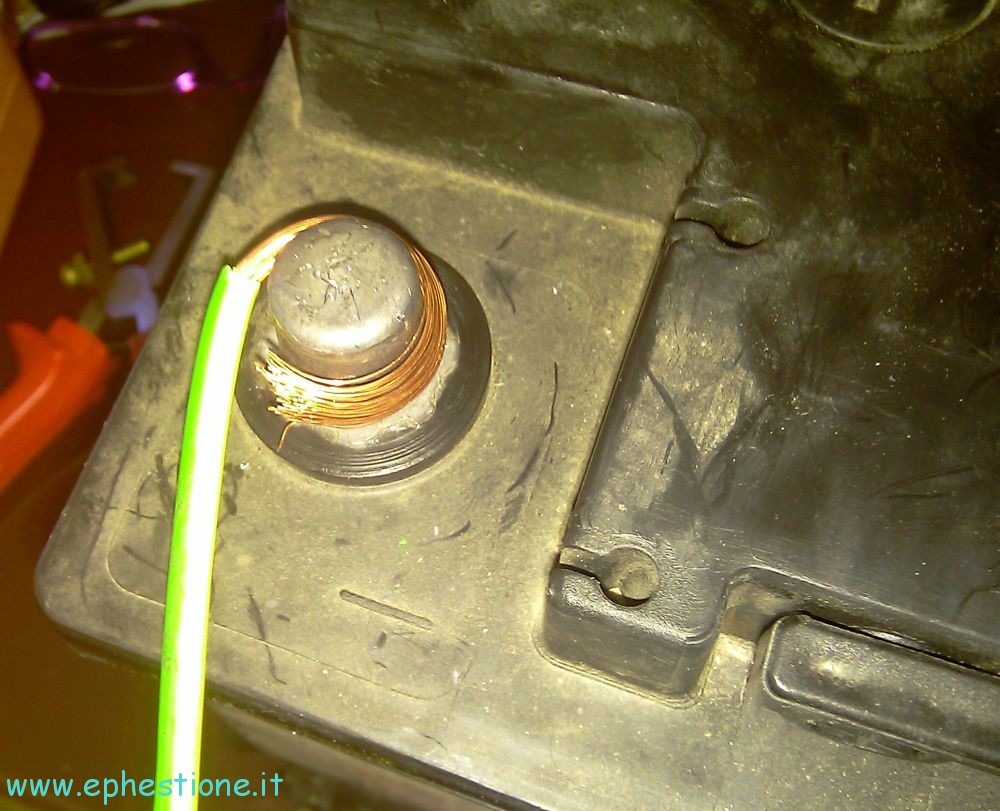
In the "car battery ups" post I wrote, several people criticized how I made the connections to the battery, both plug-wise and cable-wise. This time, I used cables 3 times larger, and since I didn't have a proper car battery clamp, nor wanted to buy one/disassemble from somewhere, I just curled the copper wire around the lead. Ugly, but in the end it's as much effective as a regular clamp (try and confute). I only had ground cables that big, so who cares, I just tagged them with coloured tape to tell them apart.
cabled car battery
Sexy. This is the final result: didn't have red insulating tape either, so I used black for negative, and white for positive.
cabled 12v 10A 120W power adapter
The cable panel for my adapter, large white cable is 220V mains input, ground cables are battery leads, and grey ones are the load (server + lcd monitor + modem/router + other stuff). Before you go and start bashing me because it's ugly: I don't care, it works and it's safe. Also, it's not visible in this picture, but each cable has its own white/black tape tags to tell if it's positive or negative lead.

Results were as following: I plugged the battery leads while the ac adapter was already powering the server, and no problem whatsoever popped up; after I did it, the wattmeter I was using immediately went down quite some figures, as the charged car battery was sharing the load together with the 12V PSU. With this setup, I can plug in/out the mains plug with no effect whatsoever on the server: load, PSU and battery are all in parallel, so it 220V inlet dies, the battery takes all the load with no hassle.

Currently, the wattemer is showing quite a lower load, since the battery was all charged: I expect it to slowly raise until full consumption, which should be little more than 42W (full stuff load, plus something more to keep the battery charged).


What would have you changed, and what do you like/dislike about this mone-morning project?

Backup installed packages list in Ubuntu and restore via Synaptic

To backup your Ubuntu install you don’t just need to keep a copy of the /home folder (or partition), since you would still need to re-fetch all the packages you installed, and that can be time consuming, especially if you carefully chose the applications to add to the system.

Synaptic already offers a similar function, which is File > Save Markings As… (be sure to fill the check box “Save full state, not only changes”, otherwise you will be probably getting a 0byte file). You can then use the File > Read Markings function to restore the package list on another system/install.

What’s the deal with this? The function actually saves indiscriminately a list of all the installed packages, including those that were installed just because they were a dependence. For example if you sudo apt-get/aptitude install packagename you will probably install also packagename-data and packagename-core or something along those lines, as they are dependencies of packagename, but the dependencies may be more complex and deeper (for example, packagename-core may also require other packages in turn); dependencies can change over time, so if package A requires package B today, a month from now that may be not true anymore; so if you passively restore the whole packagelist, you would be installing package B even if that’s not needed anymore.

The solution is to save a list of only the “main” packages, which will in turn require the correct dependencies; this can be achieved with:

aptitude search "~i ?not(~M)" -F "%p install" > packagelist.txt

This saves into packagelist.txt the list of the installed packages (~i) that were not installed automatically (not(~M)), mantaining the same format of the list generated by Synaptic, that is “packagename install” in each row, so you can seamlessly import it from Synpatic.

Zoneminder can’t chmod /dev/videoN, operation not permitted, and not starting at boot

Zoneminder has reached its current peak with version 1.24.2 since quite some time, so you can finally get it off the official repositories of Ubuntu, instead of finding then the older 1.23 as it was at the time of Jaunty, when you had to compile off the source.

Running configure and make install comes with the added benefit of making you feel nerdy, but it’s still a pain, and why doing it when you can download a deb to install it automatically?

So well, when I installed off the repos in Lucid everything went fine since the beginning, I only had to load http://localhost/zm in Firefox to get it going.

This time after upgrading to Maverick (on a new hard disk, so new fresh install), I instead faced some errors.

First I couldn’t get to the console URL, but this thread at UbuntuForums gave the solution:

sudo ln -s /etc/zm/apache.conf /etc/apache2/conf.d/zoneminder.conf

to create a link between Apache’s configuration file and Zoneminder’s shipped one, and then

sudo /etc/init.d/apache2 reload

to have Apache refresh its configuration from said file; after this, the console’s web GUI can be reached under the /zm subfolder of the webserver root.

Then, I had another problem where the sources appeared red no matter what; enabling debug I found an error relating to zmfix not being able to apply a chmod on /dev/videoN, since the operation was not permitted. Manually doing:

sudo chown www-data /dev/video*

and restarting zoneminder with

sudo /etc/init.d/zoneminder restart

solved it, but didn’t survive a reboot, as the ownership of /dev/video* goes back to root:video.

What did it for me was a:

sudo adduser www-data video

as suggested in this topic on ZoneMinder forums.

So this solved the operation not permitted error, but I was still getting an unresponsive ZoneMinder console after reboot, the status was reported as “Stopped”, and after manually starting it all went fine; there had to be something preventing ZoneMinder from properly and automatically start right after first run, so searching I found a tip in ZoneMinder Wiki, that suggested the problem lying in Ubuntu starting ZoneMinder so soon that MySQL wasn’t ready yet; delaying the start of ZoneMinder solves this, so you just need to add

sleep 15

before

zmfix -a

in the ZoneMinder startup script, which is, in the standard repository installation, /etc/init.d/zoneminder

Enjoy your videosurveillance!

sudo /etc/init.d/apache2 reloadsudo /etc/init.d/apache2 reload

Clean middle drain hole in Rover 75 (ECU flooding in non-UK models)

Credit where it’s due: I started off with this thread, where the tutorial is for UK models (supposedly it’s easier to access the middle hole from there). My Rover is a non-UK model, with steering wheel on the left (I live in Italy after all), so I had to follow a little more steps to clean it, and I thought I would share.

Rover 75 ECU area
This is the area you have to access, as it looked once the road has been cleared.
rover 75 grid over plenum
As you open the hood, access the right plenum plastic grid, release the clips (red arrows) and remove the grill.
This may look complicated, but it's easy, really: remove the screw/clips circled in red, then pull away the gasket pointed by the blue arrow, then raise the plastic frame that housed the grid you removed just before, like the yellow arrow does, and finally slide out the plastic drain panel in the direction of the green arrow.
rover 75 pollen filter ecu box
Pointed in orange is the pollen filter, in green the plastic box containing the eletronic control unit, both are hovering on a 15cm deep pool of dirty rain water.
Rover 75 middle drain hole
I couldn't get a decent picture of the flooded chamber, so I just took one after I dislodged dirt from the rubber tube, you can still see plenty of leaves and pinetree seeds in there (there was a whole pile before), I later washed them away.
rover 74 ecu
The ECU box open; there are four clips at the four corners pointed at by the red arrows; do yourself a favour, and raise the whole closed box up outside of the chamber before opening them, or you'll be in for a whole lot of pain (I even broke a clip).
Drying ECU
Ran an extension cord to my car, plugged a hair drier, and dried the hell out of the ECU, you never know. Temp/RPM gauges and HRW/aircon are still dead though.
rubber drain
Captain Hook just convinced Mr. Stupidly Designed Rubber Drain to come out of his nest.
cut rubber drain
Surgically modified rubber drain on a stick, you are now ready, just put t back in (or, rather, think it over carefully, and don't, like me).

I would like to close this article extending my sincere thanks to the cheerful people at Rover who decided to place an electronic control unit inside a chamber where water flows in, and where a useless drain is placed to get it out.

Rover 75 water leakage

Until now I have experienced two kinds of water leakage in my Rover 75. One of them is (supposedly) causing a failure of the fuel pump power output, so 99% of the times the fuel pumps (both under bonnet and in tank) receive no power and the car isn’t able to start; this leakage is due to the water piling up in a small “pool” right above the BCU and the internal fusebox, where a rubber drain is supposed to prevent this occurence, but fails to do that if you live someplace where leaves and seeds from the trees fall on your car.

rover 75 under bonnet
The area under the bonnet, the "pool" is right beneath the hood hinge.
rubber water drain
This area looks terribly dirty, but it's already been cleaned, so go figure what was inside there before. Needless to say it was filled by water, which fell inside the car, falling onto the fusebox area and wetting the passenger carpet.
rubber drain
My father says the meaning of this is to prevent dirt pieces from falling under... I say instead it's just stupid engineering. The very first solid thing that falls in there is bound to clog the drain... in my case, a whole load of pinetree seeds filled the drain up to the top.
rubber drain cut
Problem solved, I cut off the tip making the exit wide open.

The other drain, I discovered by pure chance. As I said, I investigated the first drain after the pumps failed to start, so I thought the pumps actually failed; I went and checked the in-tank pump, by pulling out the back seat; behold the surprise, there was another quite big pool of water in the recessed space close to the in-tank pump housing cover. I was able to trace the water stains up to the trunk, close to the rear lights; it was difficult to find the cause because everything was mostly dry, but I noticed a slight running water stain.

rover 75 trunk
Water was stagnating in the corner of the wheel area, and caused a major wetting of everything close to that area.
rover 75 trunk leakage
The vertical stain running on the metal gave away the water leakage.
rover 75 silver lining
The red arrow points to the part were the silver decoration has a screw running into a hole, and that's where the water came in.
faulty gasket
This is your culprit, the round gasket pressing against the metal lost its ability to isolate the inside from the outside.
rover 75 trunk shower
I putted back everything together, and tested the gasket, even if I was already sure it was faulty. So I showered the area where I suspected the leakage to be (notice the nice courtesy rainbow)
trunk water leakage
There you have it, a fresh water stream coming from the faulty gasket.
trunk water pool
Small pool formed in the trunk after the test (I had just dried the old pool, which was way larger than this). As soon as you brake, or are driving down a slope, the water streams donwards toward the backseat area, where it forms a secondary pool like the one I found.

I generously added silicone to the gasket area, both from outside and inside, and put everything back together, should be pretty much isolated by now. For the sake of it, I did the same treatment for all the accessible gaskets of the silver lining (there are two on both sides).

My no-power-to-fuel-pumps problem is not yet solved though, this car likes to play games, and when I see the pumps are working again, soon after, at the next engine start, they aren’t anymore. At this point, I suspect a faulty wire.

Virtualbox bridged network adapter driver slows down LAN speed

When I upgraded from WiFi to a physical CAT5E cable running between my router in the other room and this desktop, I jumped from 2-3MB/s tops (1MB/s usually, sometimes less) to 11-12MB/s speeds during file transfers from my home server.

Lately I was checking that the speed to download some fansubs off the server got down to 5-6MB/s, exactly half of what I was used to; I noticed there was another non specified adapter listed in Windows 7’s statusbar icon hover, and I traced it to Virtualbox’s bridged network adapter. Since I recently had installed that to test something for which I had no need anymore, I simply uninstalled Virtualbox, and as soon as the virtual network card driver was gone, speeds were back to 11-12MB/s.

Should this be in any way a normal behaviour?

MySQL query with ORDER BY,GROUP BY to remove duplicate rows after ordering

Apparently this is a widely discussed issue with MySQL; many newbies (like me) wanting to SELECT rows from a table, where they know there are duplicates of some field ‘a’ which they want unique, but making sure that the selected row has the field ‘b’ with the lower, highest, longest or shortest (whatever) value among the duplicates… well, these newbies first try and make a query like:

SELECT a, b, c FROM table WHERE <conditions> ORDER BY b DESC GROUP BY a

and they get errors and realize it’s not possible, because MySQL syntax wants the GROUP BY clause to come before the ORDER BY one, like:

SELECT a, b, c FROM table WHERE <conditions> GROUP BY a ORDER BY b DESC

In this case though, rows first get grouped, and only after duplicates are removed, they get ordered (pretty much useless for what we need).

How to go about first ordering duplicates the way we need, and then remove the rest?

To cut to the chase, this is how:

SELECT t.a, t.b, t.c 
  FROM table t
  JOIN (SELECT MIN(b) as b
    FROM table
    GROUP BY a) t2 ON t2.b = t.b
  WHERE <conditions>
  GROUP BY a
  ORDER BY NULL

What this “query skeleton” does, is ordering the rows by the field ‘b’ (ASC order, since MIN() function is used, otherwise you would be using MAX(), or anyway the function that better suits your needs) inside the JOIN operator, and then grouping these rows by field ‘a’ in the outer query; the ORDER BY NULL clause at the end is to avoid MySQL doing unnecessary ordering steps as the rows have already been ordered by the GROUP BY clause. Effective, sure, but incredibly slow query.

I thought I could go on by just using this, yet I wasn’t satisfied, as I became a performance optimization junkie during my PHP/MySQL learning curve. So I thought, what if I just get the raw rows, and order them later as I need in a PHP array?

So, let’s examine this approach instead:

$results=doquery("
  SELECT a, b, c
    FROM table
    WHERE <conditions>
  ");
$datagrid=array();
while ($slot=mysql_fetch_array($results)) $datagrid[]=$slot;
sort($datagrid);
$compare="";
foreach ($datagrid as $k=>$row)
  if ($row[0]==$compare)
    unset($datagrid[$k]);
  else
    $compare=$row[0];

After this, the multidimensional array $datagrid contains the data that you need. Some explaining is in order:

  • the SQL query returns the unprocessed rows corresponding to the WHERE conditions you specified, so you will get duplicate rows, in an arbitrary order
  • after inserting the rows data inside a multidimensional array, the sort() PHP function takes care of sorting this array depending on the sub-arrays in it, first by subarray[0], then by subarray[1] and so on (let’s open a parenthesis here: if you search for “php sort multidimensional array” on the internet, you will find all sorts of hand-made custom scripts to do this, as if sort() alone wasn’t enough; well, I have PHP5 on my hosting, and I threw a multidimensional array at it… it got splendidly sorted just as I needed, so it worked for me; in case it doesn’t for you, look on php.net function_sort user comments, there are all kinds of custom multi-sorting scripts in there, even if nothing is as fast as just sort() which is a builtin function)
  • a $compare string is initialized, and used on the following foreach loop to unset() all the subarrays where the element [0] (our ‘a’ field) is the same as the previous subarray’s [0], thus effectively pruning duplicates after the first occurrence

After this you can pass the resulting array to another routine which will process it as needed.

To take performance even further, in case you need to do a simple processing on the resulting ordered&grouped array, you can change the last foreach of the previous routine into:

foreach ($datagrid as $row)
  if ($row[0]!=$compare) {
    $compare=$row[0];
    <processing routine in here>
  }

Again, to explain, this foreach loop doesn’t care about unsetting the duplicated subarrays, but just runs your processing code on the first occurence of a subarray, ignoring the others; with this approach, you are cutting several times on the excecution time:

  1. you presumably save time as you don’t need another foreach loop to process the pruned multidimensional array, since you do everything in the first and only foreach
  2. you avoid issuing as many unset()‘s as the duplicate rows are
  3. you save on cycles and memory needed to define a new array to store the pruned data, as you only work on the very first array you built on the SQL results
  4. you simplify the foreach because you are not requesting an associative result anymore ($k=>$row) but only request the element value

With my benchmark (on a VERY reduced sets of rows, I must admit), I measured a performance increase of a whopping one hundred times (yes, exactly 100X faster) for the PHP ordering/pruning, if compared to MySQL “double-GROUP BY” approach (0.08 seconds for MySQL/PHP, against 8 seconds for MySQL only, for 100 iterations). Your results may vary on very large, or of a different kind, data sets, anyway testing will not hurt. From my 100x speed experience, there’s still plenty of leeway space.

Inverted search in MySQL database: check if keywords in field match some text

Usually, “searching a database” means looking for rows that contain a “document” in a field that matches a certain keywords set (mostly using the MATCH AGAINST construct); let’s say you want to do the opposite instead, that is finding those rows that have a field containing keywords, or a phrase, that matches to a text you already know. This is what I call an inverted search, or reverse search.

Real-life scenario: you build a website for job offers, candidates come in searching for listings that suit them, but find none, or find just a few that are not satisfactory. Either they keep coming to the website doing a search (let’s say they use the keywords “veterinar* cat” because they want to take care of animals, and like cats above all), or they subscribe to the RSS feed for that search (if your site offers one)… or they “save” this preference, and have the site send them an email as soon as a new offer pops up that matches their search, and this is where this article comes in.

Now, it’s easy to save the keywords for each user in a MySQL table, but how easy is it to check if the text of new messages matches said keywords? In PHP, you would go about building an array of keywords, and using strpos() on each of them to see if they are all contained in the text.

In MySQL you have the INSTR() which is the equivalent of PHP’s strpos(), but you cannot store arrays in a field (I mean real arrays, not serialized ones), and storing as many rows as the keywords are is going to be troublesome, as normalization isn’t needed: a “set of keywords” is mostly unique to each user subscribing to a search, so it makes sense to store them in a text field in the form of “keyword1,keyword2,keyword3,…”; again, if you were in PHP, you would do a explode(“,”,$keywords) to obtain the array of keywords, but in MySQL there is no such function, so you pretty much have to create one.

Ideally, you need a function where you pass the known document/text to match against (the concatenated subject and the body of the job offer, in this example), the string in the form “keyword1,…,keywordN“, and a parameter which tells the function that the delimiter (“glue” in PHP’s explode/implode) is a comma, so:

somefunction(document, keywords, delimiter)

This function would then return a positive integer if all of the keywords are present in the text, or 0 otherwise.

The function I put together by scraping info around was:

DELIMITER ;;

DROP FUNCTION IF EXISTS `matchkwdarray`;;
CREATE FUNCTION `matchkwdarray`(`str` text, `arr` text, `delimit` tinytext) RETURNS char(1) CHARSET utf8
 DETERMINISTIC
BEGIN
 DECLARE i INT DEFAULT 1;
 DECLARE matches INT DEFAULT 1;
 DECLARE token TINYTEXT;
 label:WHILE(matches>0) DO
 SET token=replace(substring(substring_index(arr, delimit, i), length(substring_index(arr, delimit, i - 1)) + 1), delimit, '');
 IF token='' THEN LEAVE label; END IF;

 SET matches=INSTR(str, token);
 SET i=i+1;
 END WHILE;
 RETURN matches;
END;;

DELIMITER ;

To add this to your MySQL database, you can either connect via CLI, or, as most people with a website on a shared hosting, not having command-line access, using a database frontend; phpMyAdmin, bloated as it is, doesn’t support functions/routines, so you need another one, and I found Adminer to be a massively better alternative, performance and flexibility-wise, and it’s only a 150kb-something single PHP file, which makes it all the better.

So, when you test the function, you have the following:

SELECT matchkwdarray('this is just a very simple test', 'just,test', ',')
Returns: 2

SELECT matchkwdarray('this is just a very simple test', 'some,stuff', ',')
Returns: 0

SELECT matchkwdarray('this is just a very simple test', 'this,very,stuff', ',')
Returns: 0

The function is resource efficient: as soon as a keyword is not in the text, it stops processing the keywords array. Surely, if you don’t want a 100% match but are fine with lower than that, you can easily modify the function to “stream” the whole keywords array, even removing the last character off each keywords to allow some variations, and return a percentage match which you can then evaluate later on.